Backups
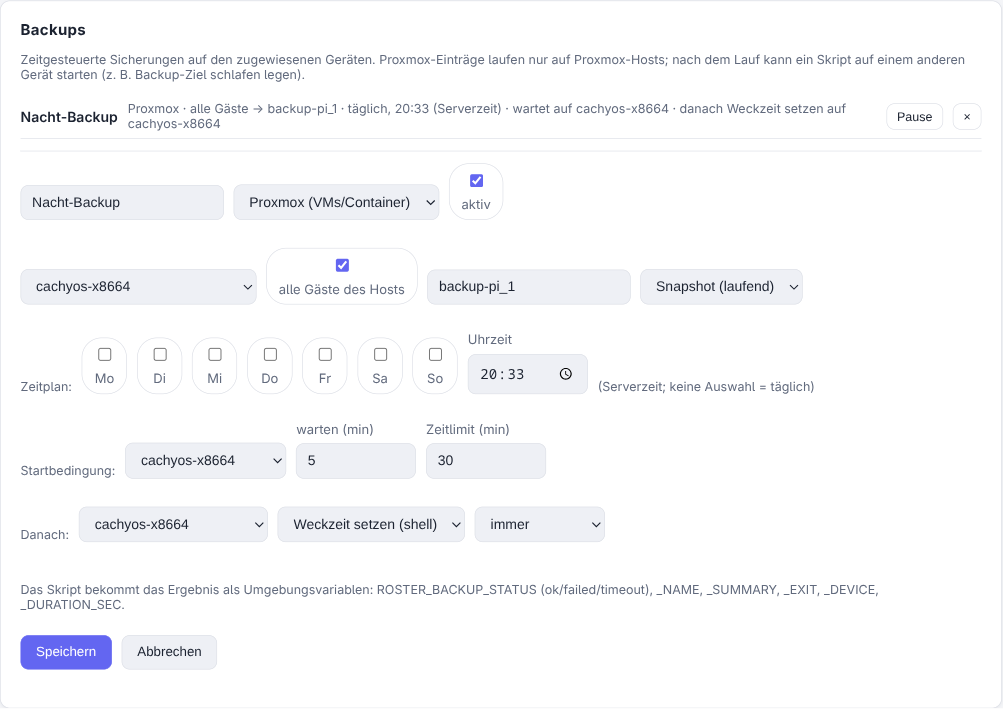
Policies have a Backups section: scheduled backups that run on the assigned devices,
with a start condition and a follow-up action on another device. Each entry has a
type — today Proxmox (VMs and containers) and Script (anything else, e.g. a
Windows PC running wbadmin or a vendor CLI).
Why this is not a task
Tasks are scheduled by the agent, which only knows itself. Backups are scheduled by the server, which is what makes three things possible:
- a start condition: begin only once another device is reachable,
- a follow-up action on a different device than the one that ran the backup,
- schedules that survive an agent restart (a task's next-run state lives in agent memory).
Times use the central time zone (Settings → General → Time zone). Without one set, they fall back to the server's own clock — which in a container is usually UTC.
An entry
| Field | Meaning |
|---|---|
| Type | Proxmox: guests (all, or picked from the host's inventory), storage, mode. Script: a script from the library. |
| Target per guest | Each guest can override the default storage, so one entry can write guest 107 to backup-pi_1 and guest 110 to backup-pi_2. The agent then runs one vzdump per node and target. Needs agent 0.16.0 — with an older one the run fails with a clear message instead of quietly using the default storage. |
| Schedule | Weekdays (none = daily) and a time. A run that is missed — server down — is caught up for up to 6 hours, never later. |
| Start condition | Wait until a device is online, up to N minutes; after that the run counts as failed. |
| Time limit | Aborts a run that takes longer. |
| Afterwards | Script + device, run always, only on success or only on failure. |
Proxmox entries only run on devices that report a Proxmox version, so assigning the policy to a whole site does not start backups on every workstation.
The follow-up action
The follow-up script runs through the agent on the chosen device and receives the result as environment variables:
| Variable | Example |
|---|---|
ROSTER_BACKUP_STATUS |
ok, failed, timeout |
ROSTER_BACKUP_NAME / _ID / _RUN_ID |
the entry and this run |
ROSTER_BACKUP_EXIT |
exit code |
ROSTER_BACKUP_SUMMARY |
e.g. 1 von 5 Gästen fehlgeschlagen – 102: device busy |
ROSTER_BACKUP_DEVICE |
host that ran the backup |
ROSTER_BACKUP_STARTED / _FINISHED / _DURATION_SEC |
timing |
Two details that matter in practice:
- With always, the follow-up runs even when the backup failed or timed out. A backup target that powers itself down after the run must not stay awake because a backup broke.
- If several backups feed the same follow-up device, only the last finished run triggers it — otherwise the first one would send the target to sleep while another backup is still writing.
Example: wake-on-schedule backup target
A Raspberry Pi holds the NFS share and wakes at 18:00; the Proxmox jobs are disabled in PVE so they never run while it sleeps.
- Backup entry, type Proxmox, all guests, storage
backup-pi_1, daily at 18:00. - Start condition: wait for the Pi, up to 30 minutes.
- Afterwards: script set next wake time on the Pi, run always — it writes
/sys/class/rtc/rtc0/wakealarmand shuts the Pi down.
The Pi needs a Roster agent for this (64-bit OS; the server ships an arm64 agent).
Compute the wake time with an explicit zone, not the Pi's system time — a fresh Raspberry
Pi OS often sits on Europe/London:
target=$(TZ=Europe/Berlin date -d "tomorrow 20:00" +%s)
echo 0 > /sys/class/rtc/rtc0/wakealarm
echo "$target" > /sys/class/rtc/rtc0/wakealarm
shutdown -h +1          # delay, so Roster still collects the result
Do not halt immediately: the agent reports the script's result at the check-in it triggers right after the run, and a machine that is already off reports nothing.
Runs
Every run is recorded: status, start, duration, per-guest summary and the tail of the vzdump log. The device page has a Backups tab with the history and a Run now button (needs the Operate devices permission). A failed or timed-out run raises an alert through the configured channels, respecting maintenance windows and minimum severity.
Proxmox jobs and the backup check
Roster starts vzdump with its own selection, so the guests are not part of a PVE
job. The resulting backups are ordinary backups — they appear in Proxmox and count
for the proxmox_backup check — but that check's option
require backup job has to be switched off, since Proxmox derives it from job
definitions.
Reach of the policies permission
Anyone who may edit policies can have a script run on another device through a follow-up action. That is the same power as scripts plus policies today, but it now crosses device boundaries.