Proxmox VE
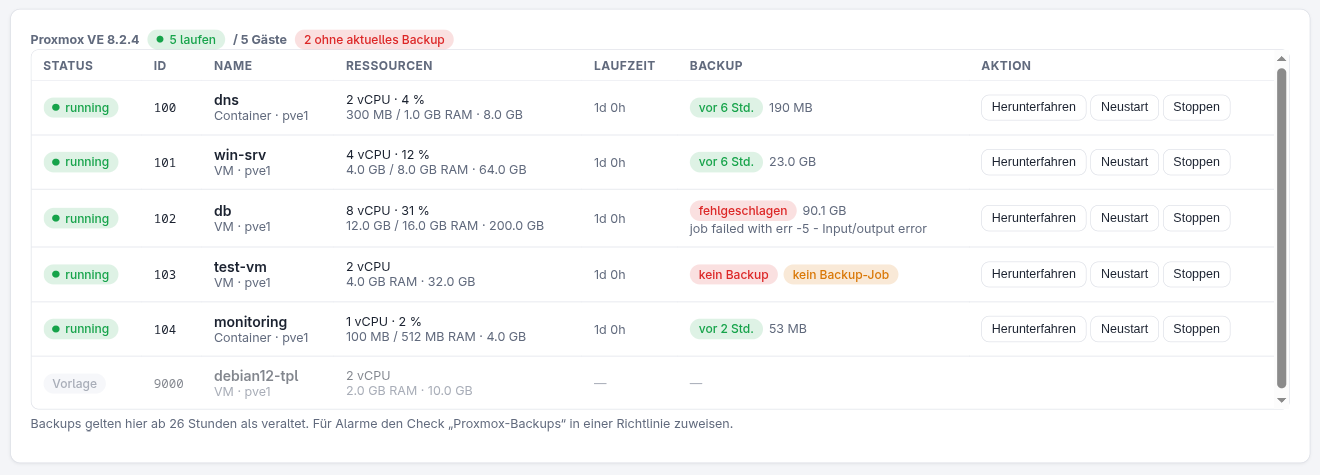
Install the Roster agent on a Proxmox VE host and the device gets a Proxmox tab: all VMs and containers of the cluster, their resources, start / shut down / reboot / stop, and the backup state of every guest — plus a check type that turns red when backups are missing, outdated or failed.
How it works
The agent detects PVE by the presence of pvesh, the local API CLI of every node. It runs
as root, so no API token is needed and the Roster server never talks to the Proxmox API
directly — everything travels through the agent's normal check-in and command channel.
pvesh works cluster-wide: one agent on one node is enough for the whole cluster.
| What | Source |
|---|---|
| Guests (VMs + containers, status, CPU/RAM/disk, uptime) | /cluster/resources?type=vm — fresh on every check-in |
| Latest backup per guest (time, size, storage, count) | content of every storage with backup content (local, NFS, PBS …) |
| Result of the last backup run per guest | vzdump tasks; job runs are parsed from their task log (Finished / failed - …) |
| Guest not in any backup job | /cluster/backup-info/not-backed-up (PVE ≥ 7.1) |
| Backup-capable storages (name, node, shared) | /cluster/resources?type=storage, everything with backup content — this fills the target dropdown in the backup form |
The guest list is fetched on every check-in so the status is right straight after an action. Backup information changes rarely and is cached for 10 minutes; parsed task logs never change and are remembered per task.
Existing Proxmox API integration
The API-token integration under Settings → Proxmox (guest reboot as check remediation) keeps working independently. The agent-based view needs no configuration at all.
Controlling guests
With the Operate devices permission, each guest has:
- Start (stopped guests)
- Shut down — clean shutdown via ACPI / container shutdown
- Reboot and Stop (hard power-off) — both ask for confirmation
The action runs as a PVE task on the host; the result and the new state arrive with the check-in that immediately follows. Every action is written to the audit log.
Starting backups from Roster
Beyond watching backups, Roster can run them: a policy's Backups section
schedules vzdump for the guests you pick, waits for the backup target to be reachable,
and can run a script on another device afterwards. Each guest may have its own target
storage, so one entry with one schedule can feed two different backup disks; the agent
then issues one vzdump per node and target.
Backup check
Add the check type Proxmox backups to a policy and assign it to the PVE host:
| Option | Default | Meaning |
|---|---|---|
| max. age (h) | 26 | latest backup may be at most this old (daily job + buffer) |
| Only VMIDs | all | comma-separated list of guests to check |
| Exclude VMIDs | — | guests to skip |
| include stopped | on | powered-off guests need a current backup too |
| require backup job | on | failing when a guest is in no backup job |
Templates are never checked. The check fails if any selected guest has no backup, an
outdated one, a failed last run, or (optionally) no backup job, and lists the
offenders in its output (the agent reports in German), e.g.
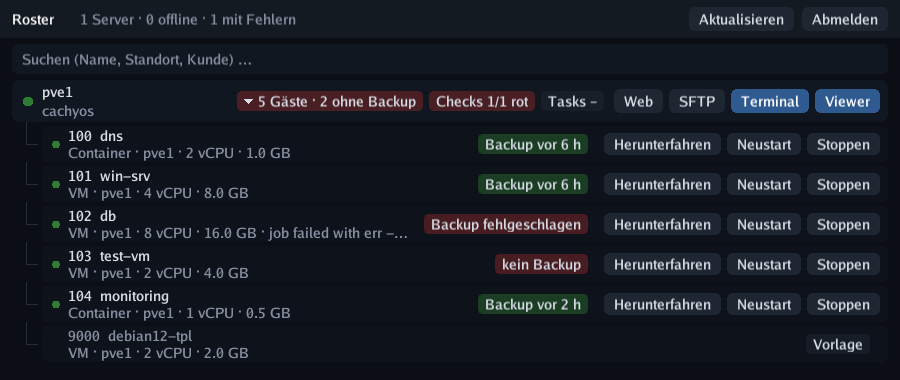
2 von 5 Gästen ohne aktuelles Backup: 102 db (letzter Lauf fehlgeschlagen: … Input/output error), 103 test-vm (kein Backup).
From there it feeds alerting, the device health badge and the red badge in the taskbar
app like any other check.
In the taskbar app
Proxmox hosts get a “5 guests” pill in the taskbar app — red with the number of guests without a current backup. Clicking it expands the guests underneath with backup badge and Start / Shut down / Reboot / Stop buttons (Reboot and Stop need a second click to confirm). Typing a VMID or guest name in the search box shows matching guests directly.